How to Run a Darts Tournament: Format, Boards, Results and Statistics
From choosing 501 and a competition format, through setting up the boards, to live results and statistics: a complete guide to running a darts tournament.
 Redakcja TG
Contents
A darts tournament makes a great event at a club, a pub, or a sports hall, but only when the organizer has the bracket, the boards, and the results under control. In this guide we show how to run a darts tournament step by step: from choosing the format, through setting up the boards, to live results and player statistics.
1. Choose the game and match format
The most popular tournament game is 501 with a double out. For less experienced players or when time is short, 301 works well. Also decide on match length: for example “first to 3 legs” in the group stage and “first to 4” in the knockout stage.
2. Pick a competition format
The format depends on the number of players, boards, and time:
- round robin: for small groups and leagues, everyone plays plenty of matches,
- group stage + knockout: the most common choice for one-day tournaments,
- double elimination or Brazilian system: one loss doesn’t knock you out,
- Swiss system: for a large number of players and a limited number of rounds,
- league: for regular competition throughout a season.
3. Set up the boards
Count your boards and estimate how long one match takes. A first-to-3-legs match of 501 usually lasts 15–25 minutes, depending on the players’ level. Plan who acts as the marker (often the loser of the previous match on that board) and how players will find out where and against whom they play.
4. Make score entry fast
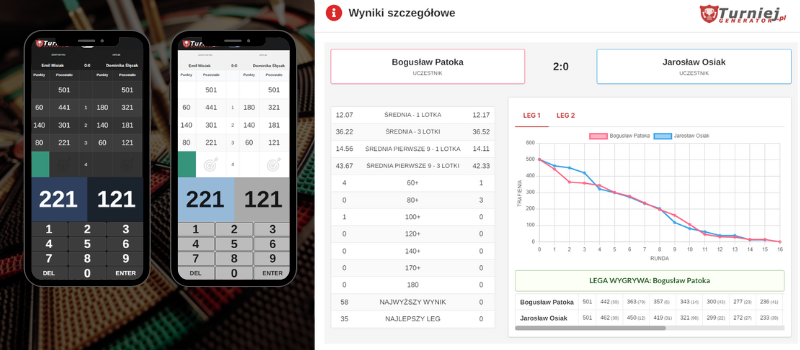
Paper score cards and chalkboards are the slowest part of any tournament. It’s much easier when players enter scores on a phone or tablet at the board and the result goes straight into the bracket.
5. Show the statistics
In darts, statistics are half the excitement: the three-dart average, the highest checkout, the number of 180s. Players compare them with each other and track their progress from one tournament to the next.
Darts tournaments in Turniej Generator
- Flexible competition formats: round robin, group stage + knockout, knockout, Brazilian, Swiss, or league.
- Match panel via QR code: players scan the code at the board and enter scores on a phone or tablet, with no app to install. The panel has light and dark themes to suit a hall, club, or pub.
- Advanced statistics: averages, checkouts, and other metrics calculated automatically.
- Live results: other players and fans follow each match without walking up to the board, with data refreshing every 3 seconds.
- Automation: the match schedule, board availability, and result tables are generated automatically. The app shows where matches are in progress and which boards are free.
- Administrator view: the organizer can also enter results and statistics by hand.
See what a real darts tournament run in the app looks like, courtesy of a darts league from Rybnik, Poland: sample DART tournament.
Running tournaments in other sports too? See what to look for in tournament software.
Frequently asked questions
Which format should I choose for a 16-player darts tournament?
Most often group stage + knockout: 4 groups of 4 players, with the top two from each group advancing to the quarterfinals. Every player gets at least 3 matches.
Do players need to install an app?
No. The match panel opens in the browser after scanning the QR code at the board or opening a link.
What statistics does the app calculate?
Among others, averages and checkouts, and players can compare their results with other participants.