How to Split Players into Fair Teams: Random Team Picking and a Free Online Team Generator
Fourteen people at five-a-side, a PE class, or a company tournament, and you need fair teams fast. Here's how to pick teams at random, how to balance skill levels, and how to do it in seconds with Turniej Generator's free team generator.
 Redakcja TG
Contents
Thursday night, five-a-side, and 14 people turn up. Or a PE lesson with 24 students and 45 minutes. Or a company tournament with 30 sign-ups. Every time, you need to do one thing: split into teams quickly and fairly. This guide shows how to divide players into even teams, how to balance skill levels, and how to do it in seconds with Turniej Generator’s (tg-app.pl) free random team generator.
Random team generator: picking teams in 3 steps
- Enter the players, one name per line. Duplicates and blank lines are skipped, and the list is saved in your browser, so you don’t have to retype it next week.
- Choose the number of teams, from 2 to 8, and give them your own names if you like. The generator shows right away how many players each team will have.
- Click to draw the teams. Copy the finished lineups in one click and paste them into your team chat.
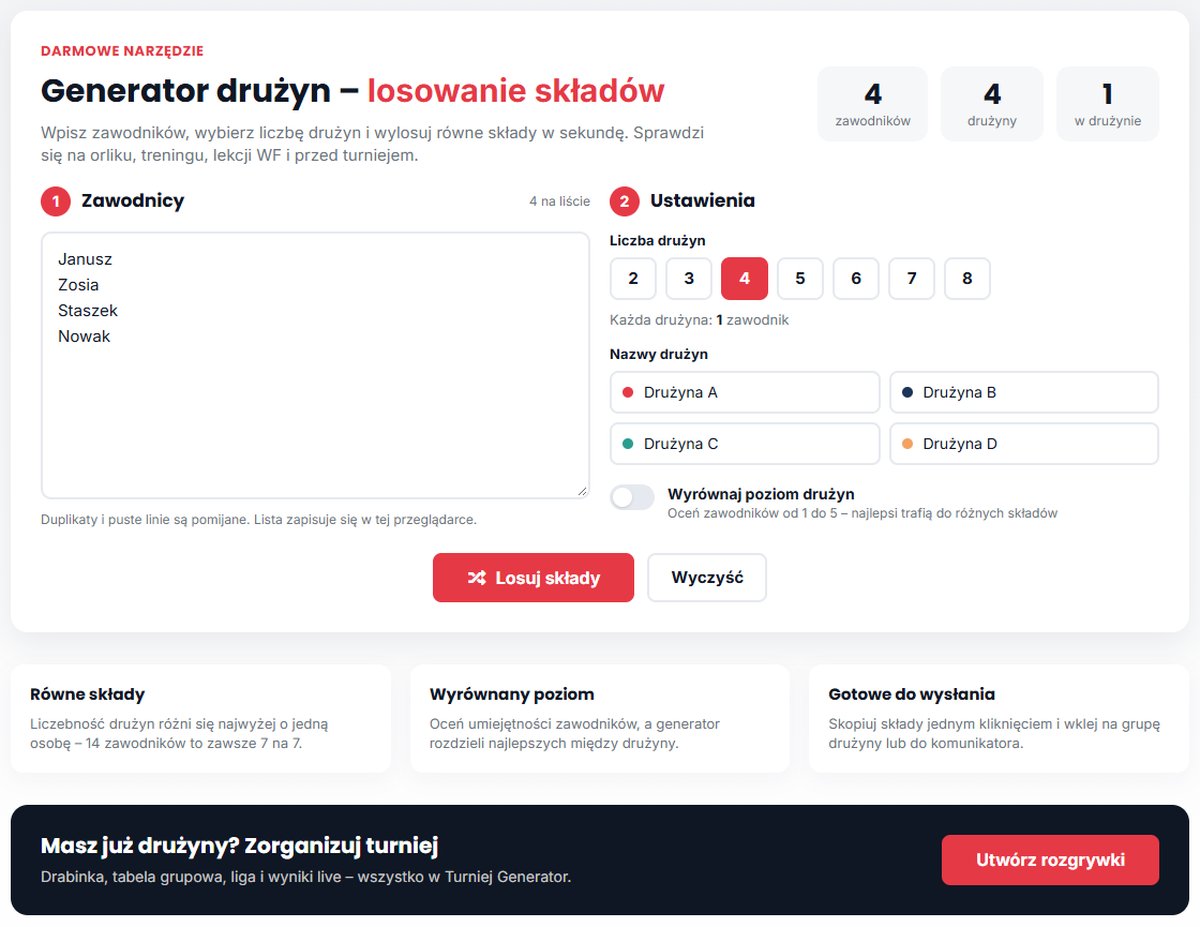
Team sizes differ by at most one player: 14 players always make 7 vs 7, and 15 players in three teams make 5, 5, and 5.
Random draw or captains picking?
| Method | Pros | Cons |
|---|---|---|
| Captains pick | traditional, captains know the players | slow, and someone is always picked last, which is especially hard on kids |
| Counting off “one, two” | quick | easy to game by where you stand, teams are often very uneven |
| Pure random split | fast and impartial | in a small group, several top players can end up together |
| Random draw with skill balancing | fast, impartial, and even games | you need to rate players once |
In PE classes and youth groups, a random draw has another advantage: nobody is left standing as the last pick. And when skill levels vary a lot, a balanced draw works best.
How to balance skill levels when you split into teams
The simplest method is to rate each player from 1 to 5 and assign them in a “snake” order: the best player to team A, the second and third to B, the fourth and fifth to A, and so on. That keeps the total skill in each team similar.
In the team generator, just turn on the balance team levels option and rate players from 1 to 5. The best players automatically go to different teams, and the rest are drawn so the teams stay even. There’s still a random element, so the lineups aren’t identical every week.
How many teams? Splitting players into teams in practice
| Players | 2 teams | 3 teams | 4 teams |
|---|---|---|---|
| 10 | 5 + 5 | 4 + 3 + 3 | 3 + 3 + 2 + 2 |
| 12 | 6 + 6 | 4 + 4 + 4 | 3 + 3 + 3 + 3 |
| 14 | 7 + 7 | 5 + 5 + 4 | 4 + 4 + 3 + 3 |
| 16 | 8 + 8 | 6 + 5 + 5 | 4 + 4 + 4 + 4 |
| 18 | 9 + 9 | 6 + 6 + 6 | 5 + 5 + 4 + 4 |
| 20 | 10 + 10 | 7 + 7 + 6 | 5 + 5 + 5 + 5 |
For a small-sided game with 14–18 people, three teams playing “winner stays on” usually beats two crowded teams of 8–9. Everyone gets more touches, and the team sitting out gets a rest.
Where a team generator helps
- Pickup and recreational games: new, even lineups every week in 10 seconds.
- PE lessons: split the class without picking and without losing lesson time.
- Club training: small-sided games, for example 4 vs 4.
- Company tournaments and team-building: mixed teams from different departments.
- Social tournaments: when individuals sign up instead of ready-made teams.
Got your teams? Run a tournament
Once the lineups are drawn, the next question is who plays whom, and when. With 3–6 teams, a round robin works best; with more, use groups and a bracket. In Turniej Generator you add the teams, choose a format, and the fixtures, standings, and tournament bracket are created for you, with live results on everyone’s phone.
Running a bigger event? See what good tournament software should do.
Frequently asked questions
Is the team generator free?
Yes. The team generator at tg-app.pl/generator-druzyn is a free tool that works in the browser, on a computer or a phone.
What if the number of players doesn’t divide evenly?
The generator splits players so teams differ by at most one person. For example, 14 players in 3 teams make 5, 5, and 4.
How do I draw balanced teams?
Turn on the balance option and rate players from 1 to 5. The best players go to different teams, and the teams end up at a similar level.
How many teams can I split players into?
From 2 to 8. You can name each team and copy the lineups in one click.