How to Build a Tournament Schedule: Match Plan, Courts and Categories
A tournament schedule step by step: how to calculate playing time, give players enough rest, assign matches to courts, and plan several categories.
 Redakcja TG
Contents
- 1. Calculate how much time you really need
- 2. Give players enough rest
- 3. Assign matches to specific venues
- 4. Several categories? Plan them separately
- 5. Leave a buffer
- Sample tournament schedule for 8 teams
- Common tournament schedule mistakes
- Match calendar and timeline in Turniej Generator
- Frequently asked questions
A good schedule is half the success of a tournament. When matches overlap, a player has two games back to back with no rest, or a court sits empty for an hour, participants notice right away. In this guide we show how to build a tournament schedule step by step: from calculating the time you need, through splitting matches across courts, to publishing the match plan.
1. Calculate how much time you really need
Start with three numbers: the number of matches, the length of one match (including the changeover between teams), and the number of available courts, tables, or fields.
Tournament time ≈ (number of matches × match length) ÷ number of courts
Example: 8 teams in a round robin play 28 matches. With 12-minute matches plus a 3-minute break and two courts, that’s 28 × 15 ÷ 2 = 210 minutes, or 3.5 hours of play alone. Add warm-up, technical breaks, and the award ceremony on top.
2. Give players enough rest
The most common scheduling mistake is one team playing match after match. Set a minimum break between games of the same participant, usually at least one time slot. In individual events where an athlete competes in several categories (for example kata and kumite in karate), also check that their starts don’t fall at the same time on different mats.
3. Assign matches to specific venues
When you have several courts, the schedule must say not only when but also where. Assigning each match to a specific court, table, or field prevents confusion and two teams turning up at the same spot.
4. Several categories? Plan them separately
At events with age or weight categories, the simplest approach is to give each category a venue, a time window, and a color. That way you can see at a glance which category is playing on which mat and when each part of the event ends.
5. Leave a buffer
Matches run long, overtime happens, and someone is always late. Leave 10–15% spare time in the plan, ideally before the knockout stage and before the finals.
Sample tournament schedule for 8 teams
What does this look like in practice? Below is a ready-made tournament schedule for 8 teams in a group stage + knockout format: two groups of 4 teams (A1–A4, B1–B4), semifinals, a third-place match, and a final. Matches last 12 minutes, a slot including the changeover is 15 minutes, and two courts are available.
| Time | Court 1 | Court 2 |
|---|---|---|
| 9:00 | A1 – A2 | A3 – A4 |
| 9:15 | B1 – B2 | B3 – B4 |
| 9:30 | A1 – A3 | A2 – A4 |
| 9:45 | B1 – B3 | B2 – B4 |
| 10:00 | A1 – A4 | A2 – A3 |
| 10:15 | B1 – B4 | B2 – B3 |
| 10:30 | time buffer, group results announced | |
| 10:45 | Semifinal: 1A – 2B | Semifinal: 1B – 2A |
| 11:00 | rest for semifinalists | |
| 11:15 | Final | Third-place match |
| 11:35 | award ceremony | |
Note a few things: the groups alternate, so every team gets at least one slot of rest between matches; there’s a buffer for delays before the knockout stage; and the final and third-place match run in parallel, so semifinalists get a break and the tournament doesn’t drag on.
For round robin play, the easiest way to order the pairings is the rotation method (Berger tables), described in the Wikipedia article on round-robin tournaments. Turniej Generator does it automatically.
Common tournament schedule mistakes
- No time for changeovers: a 12-minute match is really a 15-minute slot. A back-to-back plan with no gaps falls apart within an hour.
- The final at the very end of the day after long delays: players are tired and fans are already heading home. A shorter tournament with a buffer works better.
- A schedule only on paper at the desk: participants keep asking when they play. A match plan published online and available on their phones solves this.
- No plan B: what if a team doesn’t show up? Set rules for forfeits and rescheduling in advance.
Match calendar and timeline in Turniej Generator
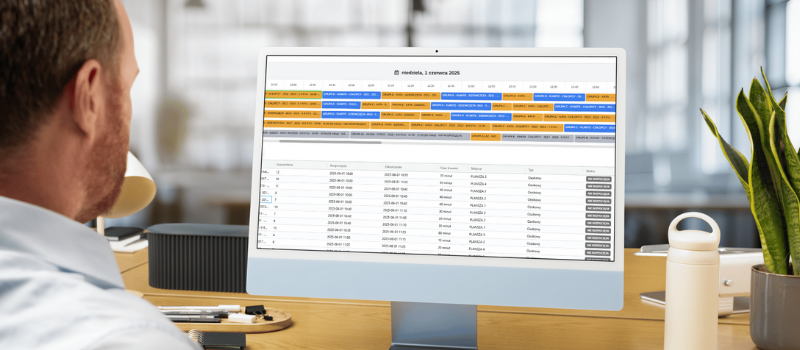
In Turniej Generator, you build the schedule in an advanced match calendar:
- Filtering by time, tournament, category, player, or team.
- Week and day views with match times on a timeline.
- Agenda view: a quick, compact overview of all events.
- Drag and drop: add and move matches with the mouse, and edit unscheduled matches from the list below the calendar.
- Venue view: assign matches to specific courts, tables, or fields.
- Category schedule: for multi-category tournaments, give each category a venue, time, and color.
See how it works in practice:
The schedule is just one piece. See what else good tournament software should have.
Frequently asked questions
How do I calculate how long a tournament will take?
Multiply the number of matches by the length of one match including the break, and divide by the number of courts. Then add time for the opening, technical breaks, the award ceremony, and a 10–15% buffer.
How do I avoid a team playing two matches in a row?
Set a minimum break between one team’s matches and check it in the timeline view with a filter on that team. Any conflict is visible immediately.
What should I do with a match that has to be rescheduled?
Move it to a new slot in the calendar or remove its date: the match goes to the list of unscheduled games, where you can easily plan it again.